Bookkeeping careers
Remote bookkeeping jobs: skills employers look for
The accounting, software, communication and data-security skills remote bookkeeping employers look for, and how to prove each one before you're hired.
By TNas · · 7 min read
Remote bookkeeping employers look for the same accounting skills as any other employer, plus proof that you can work accurately without supervision. In practice that means four things: solid bookkeeping fundamentals, comfort with cloud accounting software, clear written communication, and careful data-security habits. Because nobody can watch you work, you have to show each of these before you're hired.
This post breaks down each skill, what it looks like in daily remote work, and how to demonstrate it.
Why remote roles screen differently
In an office, a manager can glance over and catch a mistake. Remotely, the work itself is all they see. That changes what employers look for.
The U.S. Bureau of Labor Statistics (BLS) notes that bookkeeping clerks usually work in an office, often alone, and may visit clients' workplaces if they work for several firms (BLS Occupational Outlook Handbook). Remote work keeps the "often alone" part and removes the office. The BLS lists analytical skills, computer skills, attention to detail, integrity and math skills as the important qualities for the role. Each one matters more when no one is checking in person.
A remote employer is really asking three questions:
- Will your entries be right without someone reviewing each one?
- Will you raise problems clearly and early, in writing?
- Can they trust you with bank logins, payroll data and client records?
Skill 1: bookkeeping fundamentals you can apply alone
Fundamentals come first. A remote bookkeeper often handles a client's books end to end, so gaps show up quickly.
The core skills are:
- Recording journal entries with the right accounts and the right side
- Reconciling bank and card accounts every month
- Managing accounts receivable and accounts payable
- Posting month-end adjusting entries
- Spotting and correcting errors
Reconciliation: the skill remote work leans on
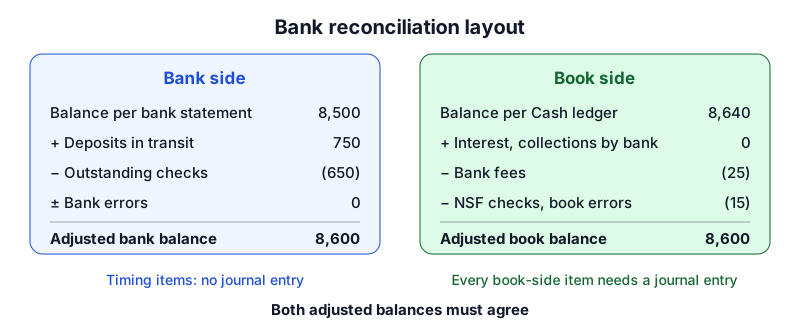
A bank reconciliation is a monthly check that compares the bank statement with the cash account in the books and explains every difference. Remote bookkeepers work almost entirely from bank feeds and statements, so the reconciliation is where the books are proven right.
Some differences need an entry on the book side. If the statement shows a $25 monthly service fee the books don't have yet, the bookkeeper records it:
| Account | Debit | Credit |
|---|---|---|
| Bank Fees Expense | $25.00 | |
| Cash | $25.00 |
The recording book adjustments lesson explains which reconciling items need entries and which are only timing differences.
Correcting errors from imported data
Bank feeds make entry faster, but automatic coding rules can put a transaction in the wrong account. A correcting entry is an entry that moves an amount from the wrong account to the right one without deleting the original. Suppose a fictional client's $420 equipment repair was coded to Office supplies expense:
| Account | Debit | Credit |
|---|---|---|
| April 30: reclassify a repair coded to supplies | ||
| Repairs and Maintenance Expense | $420.00 | |
| Office Supplies Expense | $420.00 | |
The books balanced before and after this entry. Only someone reviewing the accounts would notice the error, which is exactly what a remote employer pays for. The correcting entries lesson covers the main patterns.
Skill 2: software familiarity without depending on one system
Remote bookkeeping happens in cloud accounting software, shared drives and document tools. The BLS notes that bookkeepers use bookkeeping software, spreadsheets and databases, and that training often includes specialized software.
Employers know you may not have used their exact setup, and most expect to show you their own. What they can't teach quickly is judgment about the accounting. These are the skills that carry from one system to the next:
- Understanding what the software does underneath. Every bank-feed match, bill and invoice is still a debit and a credit. If you know the accounting, a new interface takes days to learn, not months.
- Spreadsheets. Exports, reconciliation schedules and data cleanup all happen in a spreadsheet. See Excel skills every bookkeeper needs.
- Bank feeds and rules. A bank feed is an automatic import of bank and card transactions into the accounting software. Know how its matching rules work, and when to override a suggested match that doesn't fit the source document.
- Document handling. Receipts and bills arrive as files. Naming, filing and linking them to transactions is part of the job.
Skill 3: written communication
In a remote role, most of your communication is in writing. You'll ask clients about unknown transactions, explain adjustments, and summarize the month. Clear writing saves time for everyone.
Good remote bookkeeping communication:
- Asks specific questions. "What was the $1,140 payment to a hardware supplier on March 12?" gets an answer. "Can you explain your expenses?" does not.
- Batches requests. One organized list of open items each month is easier for a client than a stream of messages.
- Explains in plain English. An owner may not know what an accrual is. "I recorded March's electricity bill in March, even though it arrives in April, so March's profit is accurate" works better.
- Documents decisions. A short note on each adjustment lets the next reviewer, or you next year, understand why it was made.
A month-end summary example
A short summary at close shows you understand the books, not just the data entry. For example:
March is closed. The bank and card accounts are reconciled. I recorded $310 of utilities incurred in March but billed in April, and $250 of depreciation. Two transactions are still open (listed below) and are sitting in a review account until you confirm them.
Skill 4: data-security habits
A remote bookkeeper often has access to bank accounts, payroll records and tax identification numbers from a home network. Employers need to know you'll protect that data.
The Federal Trade Commission's guide Protecting Personal Information: A Guide for Business is a useful baseline. Among its recommendations:
- Use strong, long passwords and never share them
- Use multi-factor authentication, meaning more than a password, such as a password plus a code sent another way
- Encrypt laptops and devices that hold sensitive data
- Use encryption for remote access to a business network
- Don't send Social Security numbers, passwords or account information by email; the FTC states that unencrypted email isn't a secure way to send information
The FTC's Cybersecurity for Small Business guidance on secure remote access adds: secure every device that connects remotely, change default router passwords, keep software updated, consider a VPN, and use WPA2 or WPA3 encryption on home Wi-Fi.
Phishing and payment-change requests
Bookkeepers who pay bills are a natural target for fraud. The FTC notes that phishing messages often look like they come from someone you know and create urgency. Its advice is to call the sender at a number you already know before acting on a request. For a bookkeeper, that means never changing a vendor's bank details or sending a payment based only on an email. Verify by phone, using contact details already on file.
| Habit | Why it matters remotely |
|---|---|
| Multi-factor authentication on every finance login | A stolen password alone isn't enough |
| Encrypted, updated work device | Protects client data if a laptop is lost |
| Secure file sharing instead of email attachments | Keeps account numbers out of inboxes |
| Phone verification of payment changes | Stops fake vendor and executive requests |
| Separate work accounts and folders per client | Prevents mixing one client's data with another's |
How to show these skills before you're hired
Because remote employers can't watch you, give them evidence:
- Pass the skills test. Employers often test candidates on entries, reconciliations and adjustments. Prepare with the skills assessment lesson.
- Show a completed project. A documented month-end close, with reconciliations and adjusting entries, proves you can work end to end. The month-end close capstone project is one option; bookkeeping portfolio projects explains how to present it.
- Include a writing sample. A one-page month-end summary like the example above shows your communication.
- Describe your security habits. Mention MFA, encrypted devices and payment verification in interviews. It signals you take client data seriously.
- Practice interview answers. The bookkeeper interview questions cover what employers typically ask.
If you'd rather work remotely for several clients as your own business, the skills are the same, plus pricing and client management. See how to start a freelance bookkeeping business.
Frequently asked questions
Can a beginner get a remote bookkeeping job?
It is possible, but remote employers usually want evidence of independent skill, since training happens at a distance. A passed skills test and a documented practice project help make up for limited experience.
Do remote bookkeepers need certification?
The BLS says certification isn't usually required, though some clerks earn one to show competence. For remote roles, demonstrated skill and references often carry the most weight.
What equipment does a remote bookkeeper need?
A reliable computer you can secure and encrypt, a stable internet connection on a protected home network, and enough screen space to work between statements and the books side by side.
What to practice next
Reconciliation and error correction are the skills remote employers rely on most. Work through the bank reconciliation exercises, then the correcting entry practice. For a test across every topic, try mixed bookkeeping practice.
Sources
- Bookkeeping, Accounting, and Auditing Clerks (Occupational Outlook Handbook) — U.S. Bureau of Labor Statistics
- Protecting Personal Information: A Guide for Business — Federal Trade Commission
- Cybersecurity for Small Business — Federal Trade Commission
Educational content for US small-business bookkeeping, not tax, legal or accounting advice. Example businesses and figures are fictional. See our editorial policy for how we write and correct content.